Blog

Resources, News and Updates

Read | Write | Tech Blog – May 2024

Official Cover Reveals!

These cover images are now live on Amazon for our forthcoming (Fall 2024) titles and it’s starting to feel real! Illustrator D. J. Cools did such amazing work. I’m delighted to see that there weren’t major changes made from the original design.


On May 2nd at 7 p.m. EST, I’ll be participating on a virtual panel presentation with Claudia Walker for National Children’s Book Week: CS For Young Readers. I’ll be speaking about my books and suggesting other resources for teaching computer science to kids. If you’d like to join us, sign up here. Tickets are $30 for non-members.


On Monday, June 24th from 3-4 p.m. I’ll be presenting Teaching CSTA K-2 Standards Using Books, Games and Songs at the 2024 ISTE conference in Denver, CO. This session will be in-person, live-streamed, and recorded for ISTE conference participants. Must register for the in-person and/or virtual conference to attend.


A2SF KidZone

Photo Credit: Nate Hatt

On Friday, June 28th from 5-8 p.m. you’ll find me and illustrator D. J. Cools with Booksweet in the KidZone tent at A2SF (formerly known as Top of the Park), giving a sneak preview reading from our forthcoming titles, Little Hackers and Little Computer Scientists, singing the Debugging and Silly Password songs from the Guidebook and teaching kids about binary, ciphers and cybersecurity vocabulary. Enter the in-person drawing for a signed copy of Social-Emotional Learning Using Makerspaces and Passion Projects and a basket of makerspace supplies. Free, In-Person Event.


Ohana Means Family is a great read aloud with repeated phrases. Consider adding movement to this one for even more engagement. For example, we pretend to reach “…into the mud to pick the taro…”.

Bilal Cooks Daal is a delightfully illustrated story that won an Asian/Pacific American Award for Literature Honor, and it even contains a daal recipe at the end!

Measuring Up is a highly engaging, heartwarming, award-winning graphic novel. Perfect for your middle grade readers.

Ashima Shiraishi is one of the youngest and most skilled climbers in the world. How to Solve a Problem is an inspiring story that pairs well with her TedxTeen talk, “Just Climb Through It”.

As the weeks speed toward Summer break and your students start getting squirmy, consider adding some digital music tools to your repertoire.

A.I. Duet is one of my favorites, it’s a fun experiment that allows you to play a duet along with A.I. Consider playing the video “How It Works”, first as it provides a good, basic explanation about how A.I. works, in general. Although the experiment shows the participants playing on a piano keyboard, note that you can just use the keyboard on your computer, or click on the notes with your mouse if you only want to play one note at a time.

Body Synth is a delight to watch. In order to make it work, you’ll need to enable your camera. The voice commands necessitate enabling the microphone too. You can then control the music with the movement of your arms, head, torso and voice.

Chrome Music Lab encompasses a variety of music experiments. My favorites are Kandinsky and Shared Piano, although Voice Spinner is guaranteed to get some laughs.

Hope you enjoyed those! I’d love to hear what you’re using to engage students for AAPI month, with digital music or A.I., in general. Consider leaving a comment below with your suggestions!

Resources, News and Updates

Read | Write | Tech Blog – April 2024

One week from today, on Monday April 8th there will be a total solar eclipse in North America! Check out this NASA site for a 3D visualization of the path of totality. To add a bit of whimsy, also consider this eclipse playlist (scroll down and preview before sharing with kids) compiled by NASA interns for the 2017 eclipse.

A Few Beautiful Minutes by Kate Allen Fox (with gorgeous illustrations from Khoa Le) is a great read to use to explain how solar eclipses work and build anticipation for this event.


MACUL name and logo

Speaking of A.I., Verse by Verse is an intriguing tool that helps you compose poetry inspired by classic American poets. Click on “let’s write a poem”, choose up to three famous poets, choose your preferred poem structure. I wrote one just now about the solar eclipse, here’s how it turned out:


If you’re someone who buys me birthday gifts, in lieu of a gift this year consider leaving a review of my first book (assuming you read or skimmed it).

Resources, News and Updates

Read | Write | Tech – Blog

Our Developing Computer Science Concepts in Early Childhood – book series – is in production!

I received a fantastic gift on Valentine’s day – that was the day our books; Little Computer Scientists, Little Hackers and Supporting the Development of Computer Science Concepts in Early Childhood: A Practical Guide for Parents and Educators, officially went into production! They’re currently slated for a Fall 2024 release.

Get notified when these books are available for pre-order by filling out this two-question form.

One of our primary motivations for writing this forthcoming book series is to inspire underrepresented groups (girls and BIPOC kids) to develop an interest in, and feel comfortable with, computer science (and technology related) careers. My illustrator D. J. Cools and I asked my students for voluntary input, for the design of our main character; how she should dress, style her hair etc. We poured through hundreds of student responses before settling on Zuri’s design. It is my sincerest hope that all kids can see themselves reflected in the pages of our books.

Zuri character design tests – images by D.J. Cools.

The kids particularly liked the shirt design in the above illustrations, so D. J. Cools made one that you can wear in real life! Get yours here.

I’ll be speaking about the forthcoming book series and a plethora of resources related to teaching computer science concepts in early childhood at the MACUL conference on Friday, March 15th. I’d love to see you there!

One of my goals (with all of my writing) is to encourage underrepresented groups (those who identify as girls/women, BIPOC folks) to feel comfortable, welcome, and empowered with computer science and technology. These organizations – Black Girls Code  and Girls Who Code are both doing really great work in that regard.

I currently run a Girls Who Code club for middle school students at my school. It’s one of my favorite parts of the week! We’re learning Python3 and web design, connecting over the shared interest of learning how to code and of course enjoying yummy snacks. I encourage you to connect with Black Girls Code and/or Girls Who Code to see if hosting a club might be something that works for you, too. You won’t regret it.

Portrait of Ada Lovelace from Wikimedia.

Ada Lovelace is considered by most to be the first computer programmer. She invented the concept of programming before computers even existed. This Kids National Geographic article has good, additional information about her.

Grace Hopper was a U.S. Navy rear admiral, one of the first computer scientists and popularized the term “debugging” (for finding and fixing errors in code) when a moth was removed from the Mark II computer she was working with. This quick video provides a great snapshot that compliments the Grace Hopper: Queen of Computer Code biography.

Dorothy Vaughan, one of the subjects of the Hidden Figures movie and books was a brilliant mathematician who taught herself and her staff the Fortran programming language. She was one of the women instrumental in helping to win the space race. This is a great animated short about her obstacles, and contributions.

I hope you enjoy these resources! I’m looking forward to sharing highlights from the MACUL conference next time. Until next month!

Image of beach in Canada with dramatic clouds.
Resources, News and Updates

Read | Write | Tech Newsletter

Image of a beach with dramatic clouds.

Photo of a beach in Canada taken in Fall 2023.

February Events & Resources

Image of the cover of the Black Boy Joy Book.
Image of Black Girls Code Logo

Photo by Thomas Despeyroux on Unsplash

Image of figure leaping in nature.

Photo by Leo_Visions on Unsplash

Image of the Python logo and words
Image of Michal Threets sitting in a chair in the library smiling.
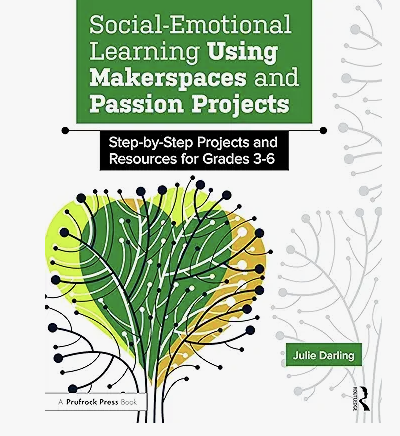
Image of the cover of the book Social-Emotional Learning Using Makerspaces and Passion Projects.
Resources, News and Updates

Read | Write | Tech Newsletter

Read. Write. Tech.
Volume 1
January 2024
A photo I took on a walk around this time of year, a few years back.
Happy New Year from gray, cold Michigan, where everything feels…dormant. That’s what I love about early January, to me everything also feels possible. It’s a perfect time to curl up with a book, a warm beverage and have a little space to think. I hope that’s how you feel too. I hope you get a chance to slow down, and some headspace to recalibrate. Some time to be cozy, warm and perhaps even daydream a bit.
This is the very first of a monthly (or so) newsletter of my thoughts and resources related to librarianship, writing, making, reading and technology. Probably not all at the same time (although you never know)!
If you have ideas for books and resources I should consider including in my upcoming newsletters, or just want to say hello, I’d love to hear from you!  Feel free to email me at authorjuliedarling@gmail.com
January Resources
Resources to celebrate MLK Day Freedom’s Ring, King’s I Have a Dream Speech – Animated From Standford.edu.
This scrolling text features animated extras, including a spoken recording of the I Have a Dream speech, contextual images, and song. 17 minutes and 8 seconds (although you can skip through it if you’d like).

Kid Explorer: Who Was MLK, Martin Luther King, Jr.?
Presented by a kid, this video covers a lot of ground in 4 minutes and 15 seconds. This would likely work well for upper elementary school and older students. Make sure to preview first, to determine if it will work for your learner(s).

University of Michigan’s MLK Symposium 2024 In-person and live streamed events from the University of Michigan, for their annual MLK Symposium.

Tech Tools to Try
Common Sense Education has developed free lessons for K-12 to effectively teach about Internet safety, digital citizenship and more. The lessons are grade-banded, age-appropriate and comprehensive.

Alice is a free download for 3D worldbuilding. It can be used to teach the fundamentals of computer science and/or an introduction to the Java programming language. This one is SUPER engaging and fun (includes a full The Sims™ character builder). Since it’s image rich, the download takes up space (i.e. this won’t work on a phone or Chromebook).
Speaking Events
Image credit: MACUL, Bill Van Loo. Pictured: Bill Van Loo, Sarah Van Loo and Myself
MACUL 2024 Conference
March 13th-15th
Grand Rapids, MI.
I’ll be speaking on Friday 3/15 at 11:30 a.m. EST

ISTE 2024 Conference
June 22nd-26th
Denver, CO.
I’ll be speaking at Monday 6/24 at 3 p.m. EST

I’ll be speaking at both conferences about teaching the Computer Science Teachers Association (CSTA) K-2 standards using books, games and songs. These talks are based on my 3 book series (forthcoming – Summer 2024); Little Hackers, Little Computer Scientists and Supporting the Development of Computer Science Concepts in Early Childhood: A Practical Guide for Parents and Educators.
As a Gen Xer who enjoys reading books featuring technology, I loved Tomorrow and Tomorrow and Tomorrow. It’s the story of two video game designers and how friendship can change and evolve over the course of decades. It also touches a little on the experience of women in male-dominated industries. Have you read it? Maybe we should start a book club?!
I recently received an exciting package in the mail. It came all the way from Japan! Yotsuba&! Is one of my favorite all-ages graphic novels. This copy is written in the original Japanese format (which I bought for a friend). The English-language version is readily available here. The whole series is really lovely.
Books My Students Loved
Some stuffies spent the night at our school and got up to shenanigans.
Just before Winter break we completed our district-wide Great Lakes Great Books competition (a Michigan-based, student choice award). K-5 students got to vote across the district (organized by one of my fabulous colleagues!) and were able to vote for their favorite selection for the actual award, regardless of the bracket winners. We’ll find out who won the official award in the Spring! In the meantime, we also voted as a district. Students learn about our district-level winners next week. Since you’re getting this sneak peek, please keep it a secret until this Friday (when all students will have heard who won during their library classes)!
District Winner for K-2nd Grades: Knight Owl by Christopher Denise
A whimsical, delightful book about bravery and unlikely friendship. Knight Owl also won a Caldecott Honor for the fabulous illustrations.
District Winner for 3rd-5th Grades: The Sweetest Scoop: Ben & Jerry’s Ice Cream Revolution by Lisa Robinson and Stacy Innerst
A picture book biography about the founders of Ben & Jerry’s ice cream. This book is entertaining, engaging and will make you want to eat ice cream…even when there’s snow on the ground.
Interested in More From Me?
Want an autographed copy of my book Social-Emotional Learning Using Makerspaces and Passion Project? You can order one here through Booksweet!
Never want to miss a book release? Follow me on my Amazon author page for updates.
A cumulative list of books mentioned in the Read. Write. Tech. newsletters can be found here.
January 2024 Newsletter Read | Write | Tech
Zines on display in our library
Projects, Uncategorized

The Zines Project

I’ve always been intrigued by Zines. The connection to feminism and counter culture is a potent, attention-grabbing mix. The Riot Grrrl movement in the 1990s, my introduction to zines, is fascinating. Current applications for zines still combine creative self-expression and providing a platform for under-represented voices. In this case the voices of kids.

Zines Defined

So what exactly are zines? They’re independently-produced, small run magazines. Before the proliferation of Internet-based blogs and social media, this was a powerful way to express ideas, particularly those outside of the main-stream. It still is.

Scaffolding a Zines Project

When introducing a zines project with kids start with some zines history. Follow this up by explaining that this is their opportunity to tell the world about something that matters to them. This could be a passion, something they know how to do, a story, or really anything else that’s meaningful. Zines can be words, images, or a combination of the two. Show them a few examples of kid-appropriate zines (or at least zine covers).

Since we made zines that were displayed to parents, sent to other schools, and to two independent bookstores, I asked students to make sure that their zines were appropriate for any age-group and didn’t include weapons or anything else frowned upon in the school setting (and I double-checked).

Zines on display during our parent night

I had them create a story outline using a beginning-middle-end storyboard. We practiced folding a mini-zine, using a template, to get the hang of it and so that they could visualize the pages and layout of their zines.

They created their zines on blank paper using their mini-zines template as guidance and I made four photocopies of each of their completed zines. Some students chose to add color and additional details to their copies before putting a copy into separate tubs to be distributed to; two schools, two independent bookstores and one copy to put on display for our parent night, (and take home to keep after). Next time we do this project, I’ll make one additional copy that they can share or trade with a friend.

Collaborating with Other Schools

Collaborating with other schools was serendipitous. One of my colleagues messaged that she was thinking of making zines with her students at the exact same time I was starting my lesson planning. She, another interested librarian, and myself shared resources and sent completed zines to each of the other schools. My students loved seeing the zines made by students at other schools.

Real-World Connections, Profits and Student Choice

The zines we sent to the bookstores were put on display. One of the stores sold each copy for $1. The proceeds were then used to purchase books for the library. The other store gave copies away and donated books to our library.

Books on display at local bookstore.
Photo Credit Meagen Kucaj – Schuler Books

The new books were chosen by the zine authors. I gave them links to a Google form to vote for the titles they wanted to see in our library, and links to resources such as the middle-grade New York Times Best-sellers list (and our online library catalogue so that they weren’t suggesting books we already owned). I made a compilation of their suggestions (with a little help from my fabulous library clerk), and had them vote for their top 3 choices.

You Should Make Zines Too!

I highly recommend making zines with kids. It’s exciting, incredibly engaging, has real-world connections, raises student voices and covers a whole host of leaning standards along the way.

I’d love to hear your thoughts! Share questions, comments and other zine-related ideas in the comments below.

#zines #realworldconnection #studentvoice #studentchoice #library #makerspace #makereducation #schoollibraries

Uncategorized

It’s Finally Here! After a five year journey -Social-Emotional Learning Using Makerspaces and Passion Projects hits the shelves today.

Book - Social Emotional Learning Using Makerspaces and Passion Projects

It’s been quite an adventure! This book went through title changes, three different publishers (before landing with marvelous Routledge), and several times I believed it might be scrapped, altogether. I did my best to make it practical, useful. My greatest hope is that some of you, out there in the wider world, are able to utilize the tips, projects and reproducibles to help kids spread a bit of brightness.

You can get your copy through Amazon or on the Routledge website use FLR40 for a 20% discount * Offer cannot be used in conjunction with any other offer or discount and only applies to books purchased directly via the Routledge website.

I’d love to hear what you think! Feel free to comment below, or shoot me an email at growingmakerspace@gmail.com. Happy reading!

Projects, Utilizing Your Makerspace

Still waiting on your COVID vaccine? Combine hygge and makerspace to make staying home more tolerable

It’s February. Here in Michigan that means it’s bitterly cold, and most days are gray. Snow, ice, and temperatures in the single digits make socializing out-of-doors a challenge. For those who are unvaccinated, socializing indoors is tempting, but it’s certainly a risk. So, how do you make staying home more tolerable?

Embrace Hygge

Instead of railing against the cold weather, why not embrace it by adopting Hygge. Think fuzzy socks, warm beverages, comfort food, candles, and anything else that helps you feel warm, cozy and content. Hygge is lovely. It can change your perception of Winter from something that has to be endured, to something truly enjoyable. Embracing Hygge is a good start, but I encourage you to take it even one step further.

Combine Hygge and Makerspace to Make it Even Better

When I’m at home, one thing that takes my mind off things (like the fact that my freshly washed, still damp hair – froze – when I stepped outside for half a second), is immersing myself in a project. If you aren’t already in the middle of a project, consider starting one now…and pick a project that embodies Hygge. Maybe for you that means knitting a pair of fuzzy socks, cooking a pot of soup from scratch, or building a rack for your wood pile from repurposed lumber. For me, it means making hand-poured candles scented with essential oils. If you’d like to give this a try, I’ve included step-by-step instructions below.

How to Make Hand-Poured – Essential Oil Scented – Container Candles

What You’ll Need

  • Heat resistant containers (mason jars, jelly jars, coffee mugs or tea cups)
  • Wicks
  • Glue dots for bottom of the wicks
  • Wax (I used soy natural candle wax flakes)
  • Something to hold the wick straight (bow tie clip, tongue depressors or craft sticks)
  • Stainless steel pouring pot
  • A second, bigger pot, to create a double-boiler
  • Water
  • Towels
  • Essential oils 
  • Long stirring spoon
  • Oven mitts
  • Food scale
  • A Tablespoon measure
  • A stove or hot plate
  • Baking soda (in case of fire)
  • Fire extinguisher

Note: You can buy most of these materials, fairly inexpensively, as part of a candle making kit. Wax flakes and essential oils may need to be purchased separately.

Instructions

Weigh your stainless steel pouring container on your food scale. Make a note of how much it weighs when empty. Add a pound of wax flakes. If you don’t have a food scale, you can just eyeball this by filling your wax pouring container until you have about 2-3 inches of space at the top.

Measure out a pound of wax flakes

Next, set up your heat resistant containers. Make sure you have several containers prepped. I found that a pound of wax filled about 4 jelly jars. Start by attaching a glue dot to the bottom of the wick.

Attach a glue dot to the bottom of your candle wick

Use the other side of the glue dot to attach the wick to the inside, center, of your candle container. Secure the top of the wick to your bow tie clip, tongue depressors or craft stick, to make sure it stays straight when you pour in the wax, later. Place your prepped containers on top of a towel to catch any wax drips.

Make sure that the wick is centered

Create a double boiler by placing the wax pouring container into a larger-sized pot, with a few inches of water inside the larger-sized pot. It should be enough water that it won’t all boil off while you’re melting the wax, but not so much that water will pour over the side of your wax pouring container and into your melting wax. 

Place your double-boiler on top of the stove top or hot plate, and turn the temperature up to medium-high.

Use a double-boiler to melt your wax

Keep an eye on your melting wax at all times. Make sure you have the baking soda and fire extinguisher within reach. You can’t use water to put out a wax fire. Baking soda or a fire extinguisher will work. Stirring the wax with a long spoon will help it melt more quickly. Once your wax is completely melted, remove your wax pouring container from the double boiler and place on a towel.

If you’re using wax with a higher melting point than 130 degrees Fahrenheit, you’ll want to wait until the wax cools to 130 degrees Fahrenheit before adding in your essential oils, or they can burn off, leaving you with a lightly-scented, or unscented candle. If you don’t have a candy thermometer, you can also just add the essential oils once the side of your wax pouring container is still warm to the touch (but not so hot that it burns your hand) and the wax is still liquid.

Measure out 1 Tablespoon of essential oil (this can be just one scent or several blended). Pour your essential oil into the melted wax, a little at a time, continuing to stir the wax as you’re adding the oil. This is the part of candle making that my kids liked best, they really enjoyed coming up with recipes for the candle scents. One of the completed candles ended up smelling a little bit like bug spray, so we named that one “Summer Nights”. If you want better control over the scent, you might want to stick with just one essential oil.

Pour your wax into your prepared containers, leaving about 1/2 -1 inch of space at the top.

Pour the melted wax into your prepared containers

Once your wax has cooled enough that it’s solid, remove your popsicle stick (or whatever you used to secure your wick). Using scissors, trim your wick to 1/2-1 inch above the top of the wax.

These candles make great gifts too!

Good luck! Stay safe. If you have a maker project that’s also Hygge, I’d love to hear about it in the comments.

3D Printing, COVID-19, Sewing, Utilizing Your Makerspace

Making PPE Masks and Ear Savers

Mask hand sewn by Paula Lawrence

Recently, the recommendation came down from the CDC for everyone to wear cloth masks when going out in public to prevent the spread of COVID-19. Masks are currently hard to come by in stores, which, incidentally, you should stay out of if you can. If you don’t already have one, you’ll need to make one. 

Making Your Mask

CNN recently published detailed instructions on making masks. This includes a pattern to sew, and a no sew option. The Washington Post added to the discussion with information about what kind of materials to use and why.

Making Masks for Healthcare Professionals

Many hospitals are now accepting donations of homemade masks. If you have materials to make more masks than you need in your household, you might consider making and donating them.

Ear Savers

I’ve been talking with a local medical professional who is asking for people to provide ear savers, too. Ear savers can be made from different materials. The goal is to keep ears from getting irritated when wearing a mask all day. There are two main types: sewn and 3D printed. The doctor I spoke to requested the sewn, headband style. You can watch a tutorial on how to make it from scratch here. However, if you have cloth headbands that you’d like to donate, you can wash them, then skip to the last step of simply adding buttons. The  3D printed surgical mask strap style can be found as a downloadable pattern on Thingaverse.

Using Masks Properly

When you are wearing your mask out in the world, you need to know that you are doing it correctly. You should make certain that your mask covers both your mouth and your nose. Just like you aren’t supposed to touch your face, you should avoid touching your mask. This CNBC article provides more details about what you should, and shouldn’t do, and includes information about how to properly clean your mask.

That’s it for now. Stay safe out there! If you have any suggestions about masks, ear savers or anything else, I welcome your input in the comments below.

3D Printing, COVID-19, Sewing, Utilizing Your Makerspace

Local Michigan Makers are Helping Supply Hospitals with PPE and You Can Too!

Help Your Local Hospital by Sewing Masks!

The U.S. just surged to the top of the charts with the highest number of confirmed COVID-19 cases in the world. Although these numbers are grim, especially considering that US hospitals are already experiencing a critical shortage in personal protective equipment, there are makers working, in our community, to help bridge the gap.

How to Help

If you are considering pitching in, by 3D printing, sewing or otherwise, start by reading the information on the GetUsPPE site. Next, check with local hospitals regarding what they are currently accepting. Here is the rundown on what’s being accepted in the metro Detroit hospitals. As of today, the only hospital accepting hand-sewn masks in metro Detroit is Beaumont. Don’t let that dissuade you. There are hospitals all over the world accepting hand-sewn masks. With the situation in the U.S. getting worse by the day, most likely more local hospitals will start accepting these, too.

Making Hand Sewn Masks

Deconess has written information and a video tutorial about how to hand-sew masks. Joanne Fabrics has tutorials, and they are also giving away supplies. Sewing masks can be done by beginners, and Joanne is offering to support makers in creating them. They are also distributing them to local hospitals “This is a grassroots effort, and we will connect with hospitals near our stores to provide the items to local hospitals, so they can be used at their discretion” (https://www.joann.com/make-to-give-response/).

Making Face/Eye Shields

If you have a 3D printer, you can also help by making face or eye shields. Teachers in the Ann Arbor Public Schools have started work on these. How-to information, including design files, can be found on the CoVid 19 “Operation Face Shield” site. 

More Help is Coming Soon

Several well-known fashion brands including Ralph Lauren are gearing up to produce masks and isolation gowns, but will they be able to produce enough, and can they retro-fit their factories quickly enough? Hopefully so. In the meantime, you can help to bridge the gap.